
- Home
- FAQ
FAQ
- Flyers
- Stickers & Labels
- Business Cards
- Large Format Printing
- Graphic Design
- Campaign Printing
- Same Day Printing
- Direct Mail
- Announcements & Invites
- Badges & Lanyards
- Black EDGE Cards
- Booklets & Catalogs
- Bookmarks
- Brochures
- Business Cards
- Calendars
- CD Inserts
- Door Hangers
- Drink Coasters
- Event Tickets
- Flyers
- Foil Printing
- Greeting Cards
- Hang Tags
- Health & Safety
- Letterhead & Envelope
- Linen Uncoated
- Luster Cards
- Magnets
- NCR Forms
- Notepads
- Plastic Cards
- Posters
- Postcards
- Presentation Folders
- Restaurant Menus
- Roll Labels
- Same Day Printing
- Sample Packet
- Sell Sheets
- Stickers
- Table Tents
Popular Products
Printing Services
Large Format
Mailing
Promo Products

If you send us an RGB file, there is a chance that a color shift may occur and you may not be satisfied with your job.
THESE COLORS ARE IN RGB

THESE ARE THE SAME COLORS BUT IN CMYK

You should always start and finish your designs in CMYK color mode.
Low resolution files may be printed as is or will be placed on hold until we receive new files, slowing your turn-around.
THESE ARE 72 DPI LOW RES IMAGES

THESE ARE THE SAME IMAGES BUT AT 300 DPI

We only accept 300 dpi files and no less.
Bleed must extend further than the cut line. Using one of our Templates can help you visulize this. Please keep all text and anything you do not want to get cut off at least .125" away from the cut lines.
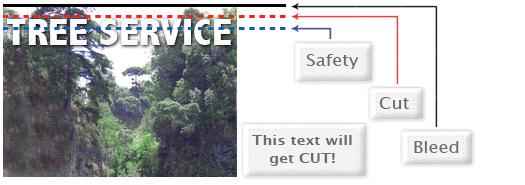
When sending an .eps or .pdf, make sure you include crop marks so we can cut the job correctly.
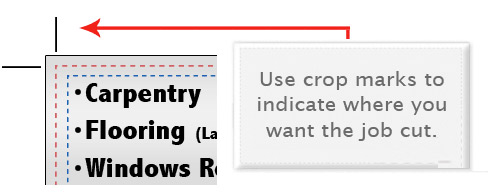
Click here to go to our production templates.
Yes but if the border is too close to the cutline, it may be off-center slightly.
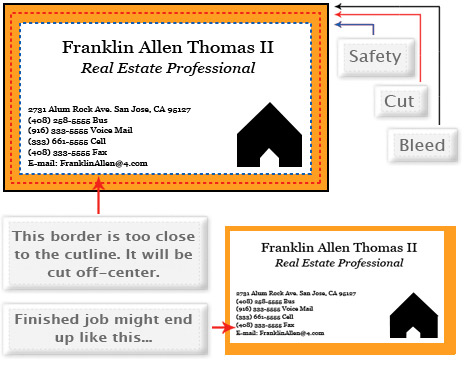
We cut through many sheets at one time, so watch your borders to avoid an unwanted mistake.
No. Each side of the job needs to be on a seperate file.
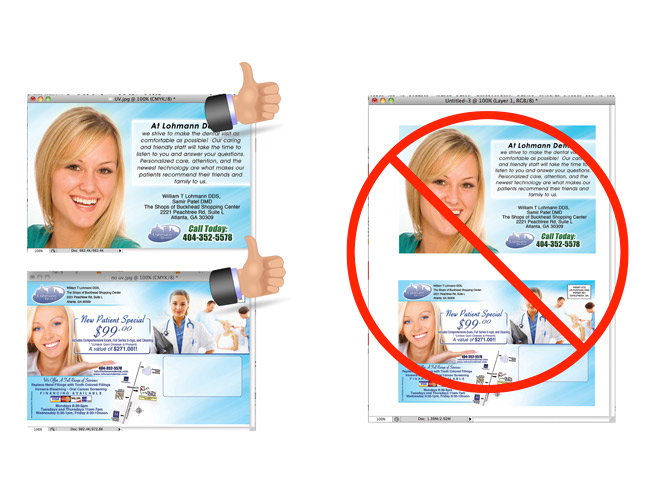
When creating a Spot UV Job, you must include a Spot UV template file along with the regular full color file. The Spot UV fileis used to show where the UV will be placed.
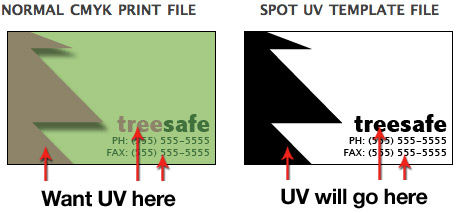
Use 100% K to indicate where you would like the UV. White will indicate no UV.
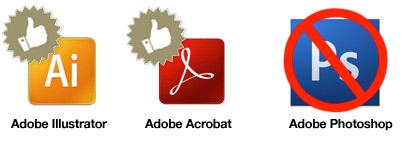
Silver ink files must be sent in a vector format. You must use a vector program, like Illustrator or Indesign, to call out the object you want in silver ink.

To indicate the silver ink, you must set the object color to Pantone¨ 877 C. Any other color will not be accepted as silver. Also, labeling the layer as "silver mask" or "silver" will not qualify your file.
VECTOR BASED PROGRAMS RASTER PROGRAMS
When using a blue in your design, always make sure to leave at least a 30% difference in your Cyan and Magenta values.
100% C 100% M 0% Y 0% K
ON SCREEN

AFTER PRINTING

Blue is close to purple in the CMYK spectrum. Remember, use a low amount of magenta whenever using high amounts of cyan to avoid purple.
EXAMPLE: C-100 M-70 Y-0 K-0
When exporting from any program such as Indesign or Illustrator, use these settings to make sure your .PDF files export correctly.
EXPORT SETTINGS FOR .PDF FILES
Adobe PDF Preset is set to: Press Quality

Compatibility is set to: Acrobat 4 (PDF 1.3)

Compress Text and Line Art is set to: Off

Grayscale images that are converted to CMYK will have a color shift in the final print. That shift may be green or yellow.
GRAYSCALE ON SCREEN

GRAYSCALE AFTER PRINT

Always check the CMYK values of your grayscale in the final CMYK document. If there are other values other than K in your grayscale image, there is a chance that the color will vary.
To eliminate all values other than K, use your Channel Mixer (adjustment layer) in Photoshop, then click "Monochrome" and adjust accordingly.
Rich black is an ink mixture of solid black, 100% K, with additional CMY ink values. This results in a darker tone than black ink alone. If you print black alone as 100% K, the resulting black may not be as dark as you might like.
100% K ON SCREEN

100% K AFTER PRINT

We recommend using C 60 M 40 Y 40 K 100
This will give you a deep, dark, rich black.
Cracking of the edges of a business card sometimes occurs when the card contains high values of ink, as in dark colors.
CLOSE UP OF BUSINESS CARD
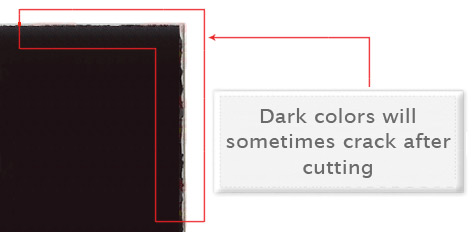
This usually happens on a small amount of cards in the run. To prevent this, use lighter colors or if you must use dark colors, use as little ink as possible.
Many things can cause banding. Banding can be caused by the program that it is exported from, such as Indesign or Corel. Also, too many gradient steps, for example going from a very light color to a dark color, in a small area will cause banding.
CLOSE UP OF BANDING

To prevent this, check your digital files before sending. If you use a gradient, make sure it has enough room for a smooth transition.
When a job is coated with UV then scored and folded the job may begin to crack. During use, the cracks will become bigger and the ink may start to chip off.
CLOSE UP SCORING
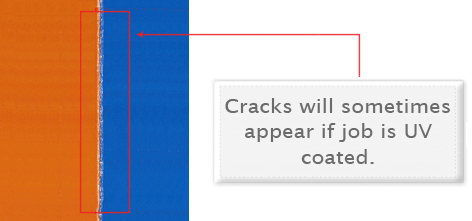
Cracking is normal when coated jobs are scored and folded. Ordering the job without UV will help but may not prevent this. As the job is used and folded more and more, cracking will eventually happen.
When creating a Spot AQ job, you must include a Spot AQ template along with the regular full color file. The Spot AQ template file is used to show where the AQ will be placed.
NORMAL CMYK PRINT FILE SPOT AQ TEMPLATE FILE
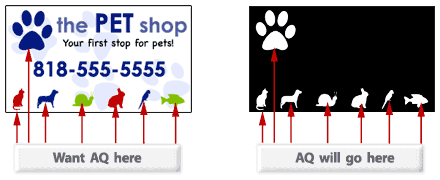
Use white, 0C 0M 0Y 0K, to indicate where you would like the AQ. Black, 100%K, will indicate no AQ.
Quick Links

Atlanta, GA 30309